Playwright Locator Helper (Chrome extension)
What it is
playwright-locator is a Chrome extension that helps you generate and sanity-check Playwright-style locators against the page you are looking at. It is a fork of tickytec/Playwright-Locator-Assistant, with a few workflow tweaks I wanted for day-to-day test authoring.
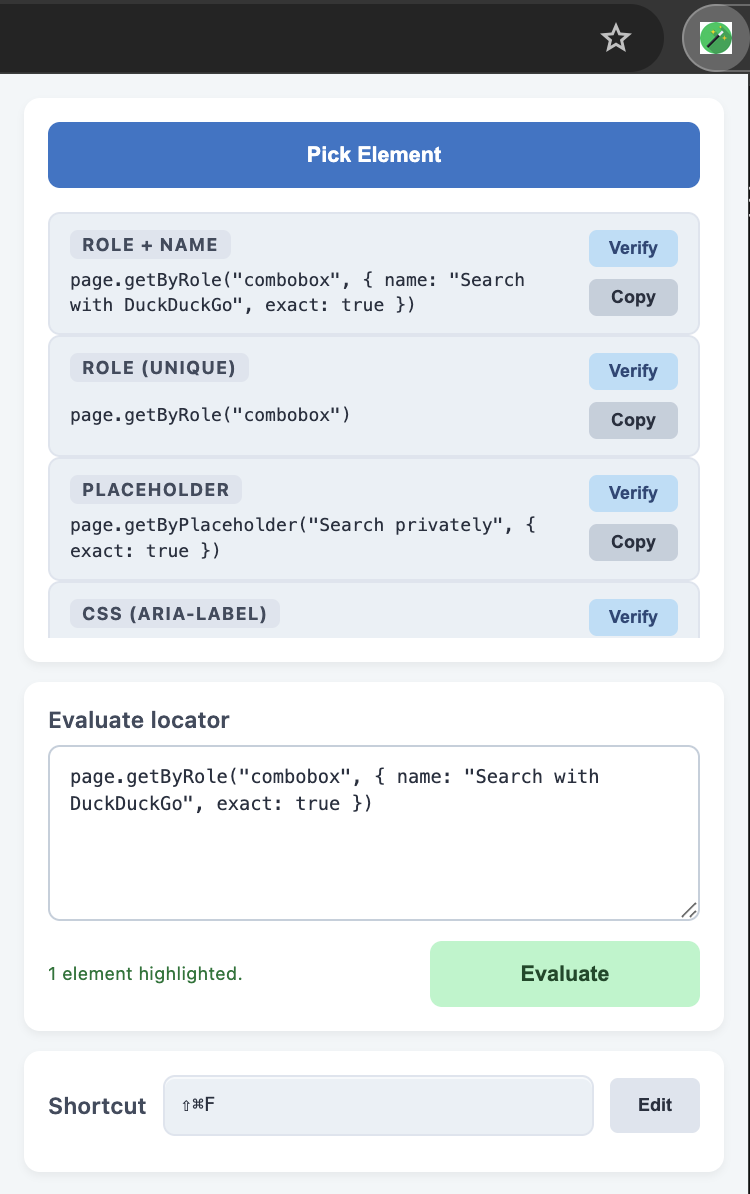
What changed in my fork
- Ranked suggestions by role, text, placeholder / alt / title, test id, or CSS.
- Keyboard shortcut to toggle pick mode (useful for dropdowns, hover, and other fiddly targets).
- Highlights when capturing and when verifying matches.
- Simpler popup flow for a single “current pick” instead of a long history list.
- Support for evaluating
.nth()style locators when you need disambiguation, and chaining locators and filtering.
Core features
-
Pick Element — crosshair mode with hover outline; uses
composedPath()where it helps for nested or shadow DOM. -
Up to five strategies per pick — each row has Verify and Copy; output is
Playwright JS /
playwright-teststyle (page.getByRole(…), and so on). -
Chaining enhancement — when a node is not unique, the tool can walk up to a stable parent and build a chained locator (for
example
page.locator('a').getByRole('listitem', { name: '…' })). -
Filtering — when a node is not unique, the tool can filter by text, placeholder, alt, title, test id, or CSS.
For example,
page.locator('a').filter({ hasText: '…' }), or add.nth(1)to the end to narrow down to a specific item. -
Evaluate locator — paste
page.getBy…,page.locator('…'), or a CSS selector; Ctrl+Enter (Windows/Linux) or ⌘+Enter (macOS) runs it, same idea as Verify on the active tab. - Match highlighting — successful Verify/Evaluate runs outline matches in green; highlights clear when you close the popup or re-enter pick mode so the page does not keep stale overlays.
- On-page banner — because the popup cannot be semi-transparent, a short frosted banner on the page shows match counts after Verify/Evaluate; it auto-dismisses or you can click Dismiss.
Install (load unpacked)
- Open Chrome → Extensions.
- Turn on Developer mode.
- Click Load unpacked and select the repo folder that contains
manifest.json.
Optional: set a comfortable shortcut under Extensions → Details → Extension shortcuts (default is Ctrl+Shift+F / ⌘⇧F for pick mode).
Typical flow
- Open the extension popup → Pick Element → click the target on the page.
- Review the suggested strategies → Verify the one that matches what you meant.
- Copy the locator into your Playwright test.
Publish the extension
The extension is available on the Chrome Web Store: Playwright Locator Helper
Further reading
Playwright’s locator docs cover getByRole, getByText, getByLabel, CSS, and XPath—worth
skimming so the extension’s suggestions map cleanly to how you write tests. For a concise walkthrough of those ideas, see
Playwright locators guide: getByRole, getByText, getByLabel, CSS, XPath
on DEV.